Rebasing is a powerful feature of Git which allows the commit history of branches and commits in a repository to be rearranged.
In SmartGit, there are several ways to initiate a rebase:
Menu and toolbar: On the Working Tree window, select Branch | Rebase to open the Rebase dialog, where you can select the commit to which the HEAD commits should be rebased.
You can open this dialog using the Rebase toolbar button, depending on your toolbar settings.
Branches view: In the Branches view, you can right-click on a branch and select Rebase to rebase your current HEAD onto the selected branch.
On the Graph of the Log Window and Standard Window, you can use either of these approaches:
Option 1: You can perform a rebase by choosing Rebase from the Graph context menu on a selected commit.
Option 2: You can drag and drop commits or refs and then select to rebase in the occurring dialog after the drop.
To drag commits in the Standard Window, select My History or All Branches + Tags first.
When you start a rebase from a selected commit in the Graph, SmartGit may first show Rebase HEAD to Selected Commit, offering Rebase HEAD to and Rebase Interactively.
When rebasing a branch onto an ancestor of HEAD other than its direct parent, the confirmation offers Rebase Single Commit and Rebase Interactive.
Choose Rebase Single Commit to rebase only HEAD onto the target, or Rebase Interactive to edit the commits after the target.
In the Standard Window, you can also drag branches and choose Rebase HEAD to from the popup.
As with merge and cherry-picking, a rebasing may fail due to merge conflicts.
When a conflict happens, SmartGit will leave the Working Tree in rebasing state, allowing you to either resolve the conflicts or to Abort the rebase manually.
For a rebase already in progress, SmartGit provides the Rebase in progress dialog with Continue rebase, Skip current patch, and Abort rebase. Continue rebase remains disabled until all conflicts have been resolved.
Note
If a normal abort fails and SmartGit cannot find usable rebase state, it tries git rebase --quit.
Quitting ends the rebase without resetting HEAD, the index, or the working tree.
In addition, SmartGit provides advanced UI to support interactive rebasing.
Please refer to Interactive Rebasing.
Rebase Onto
Rebasing Onto allows the parent commit of an existing commit to be changed.
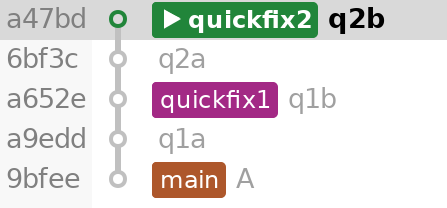
Example: In the below, we’ve made a mistake when starting branch quickfix2.
Instead of creating a new branch from main, we’ve accidentally branched off branch quickfix1.
As a result, quickfix2 also has all the commits that quickfix1 in its branch, which means that quickfix2 cannot be merged into main independently of quickfix1.
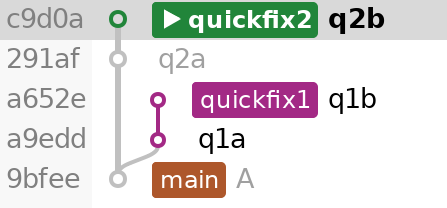
To fix this, we need the quickfix2 branch to start on the main branch instead of the quickfix1 branch.
The command sequence below performs this rebase.
Beforequickfix2 starts at q1b and includes the commits from quickfix1.
Git commands
git rebase --onto main quickfix1
Afterquickfix2 starts at A and contains only rewritten q2a and q2b.
By default, dragging a commit onto one of its own ancestors does not offer the Rebase operation.
This is intended, as such operations are relatively infrequent and offering this operation may negatively impact usability for most users.
If you want to do such operations using drag-and-drop in the graph, such as a Rebase for a single commit, enable advanced drag-and-drop operations by configuring Low-Level Propertylog.graph.dragAndDrop.offerAdvancedOperationsForDropsOntoAncestors.
Resolving Conflicts
When a merge conflict occurs during Git rebasing, rebase conflicts differ from regular merge conflicts because the left and right files are swapped in the 3-way merge process.
e.g. when rebasing branch A onto branch B, Git first checks out branch B, then applies all commits from branch A.
If a conflict occurs during the rebase operation, the HEAD of the Working Tree will be left pointing to branch B, so files in the left pane refer to the version in branch B, and the right pane will be branch A.