A commit is a set of file changes stored in a repository along with a commit message.
The Commit command is used to store working tree changes (which have been staged) in the local repository, thereby creating a new commit.
Commit Graph
Repositories generally1 start with an initial root commit, and each subsequent commit will be directly based on one or more parent commits.
This creates a ‘commit graph’ (technically a Directed Acyclic Graph (DAG) consisting of of commit nodes), with each commit being a direct or indirect descendant of the initial commit.
Hence, a commit is not just a set of changes; due to its fixed location in the commit graph, it also represents a unique repository state.
Note
1 It is possible for a Git repository to contain more than one root commit (git checkout --orphan) and therefore contain multiple unrelated commit graphs.
The wisdom of having more than one root commit needs to be balanced against creating separate repositories for each project.
Therefore:
The initial commit has no parent commits.
Normal commits have exactly one parent commit.
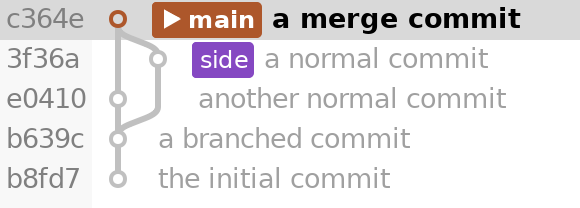
Merge commits have two or more parent commits.
ResultA repository with a merge commitRecreate this repository
Run these commands in a fresh directory.
git init -b main
echo Example repository > README.md
git add README.md
git commit -m"the initial commit"echo Shared work > shared.txt
git add shared.txt
git commit -m"a branched commit"
git switch -c side
echo Work on side > side.txt
git add side.txt
git commit -m"a normal commit"
git switch main
echo Work on main > main.txt
git add main.txt
git commit -m"another normal commit"
git merge --no-ff side -m"a merge commit"
Each commit is identified by its unique SHA-ID, and Git allows checking out every commit using its SHA.
However, with SmartGit you can visually select the commits to check out instead of entering unwieldy SHAs manually.
Checking out sets the HEAD and working tree to the commit.
After modifying the working tree, committing your changes will create a new commit whose parent is the one that was checked out.
Newly created commits will also be heads in the DAG, because no other commits descend from them.
Putting it all together
The following sequence shows how commits, branches, pushing, fetching, and merging interact.
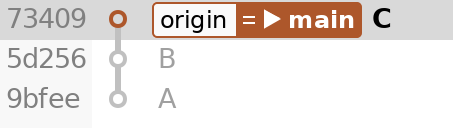
Start with commits A, B, and C.
Both main and origin/main point to C, and HEAD is attached to main.
To recreate this example, run this setup in an empty directory. The remaining steps continue inside repo.
git init --bare-b main origin.git
git clone origin.git repo
cd repo
echo A > a.txt
git add a.txt
git commit -m"A"echo B > b.txt
git add b.txt
git commit -m"B"echo C > c.txt
git add c.txt
git commit -m"C"
git push --set-upstream origin main
1. Initial repositorymain and origin/main both point to C.
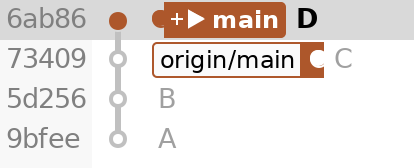
Create commit D, a child of C.
Local main is now one commit ahead of origin/main.
echo D > d.txt
git add d.txt
git commit -m"D"
2. After committing Dmain points to D; origin/main stays at C.
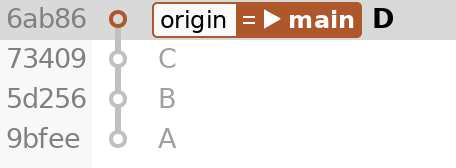
Push D to the remote.
Its main advances to D, and the local remote-tracking ref origin/main also moves to D.
git push origin main
3. After pushing Dmain and origin/main both point to D.
A colleague creates E on top of D and pushes it.
The first commands below simulate that work in a separate clone.
Fetching then updates origin/main in repo without moving local main.
git clone ../origin.git ../colleague
cd ../colleague
echo E > e.txt
git add e.txt
git commit -m E
git push origin main
cd ../repo
git fetch origin
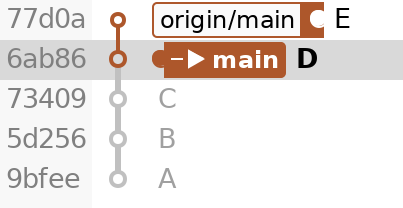
4. After fetching Eorigin/main points to E; local main stays at D.
Merge origin/main into local main.
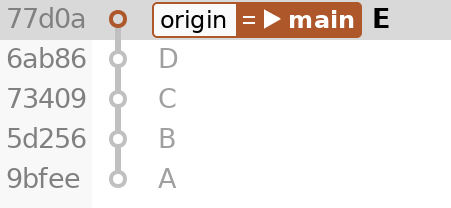
Since there are no new local commits, Git fast-forwards main to E without creating a merge commit.
git merge --ff-only origin/main
5. After fast-forwarding mainmain and origin/main both point to E.